Quick little tutorial on how to make a hidden folder in Windows 7.
The folder will have no name and it will be completely invisible unless you highlight it.
What you need:
1) Windows 7
2) The Windows 7 sidebar (Preferably the Calender app)
3) Some computer knowledge
And that's about it!
Tutorial:
First, make a new folder on the desktop: [1]

Step 2): Right click on the Folder and go to customization: [2]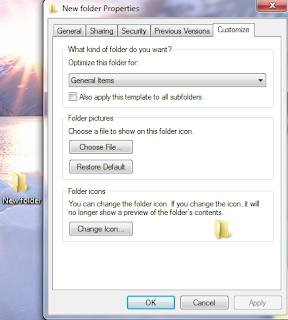
Step 3): Click on "Change Icon..." And scroll right till you see an icon with nothing like as shown: [3]
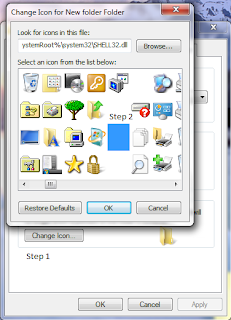
Step 4): Now click Ok then click Apply and you should get something like this: [4]
Step 5): Now click start then type in character map in the search bar. Open it and find a blank space. I will show you the slot to make it easier to find: [5] Click select then copy. You will see nothing in the "Characters to Copy" bar, that is perfectly fine.
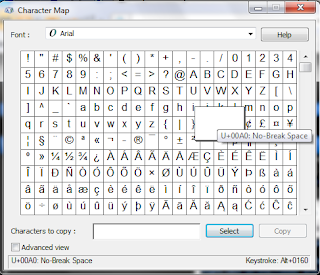
Step 6): Now right click on the folder and click rename. Press CTRL + V and you will get nothing as the name. When you click apply, nothing should show up as the name: [6]

Step 7): Now find the folder and the calendar sidebar app. Drag the Calender out of the way and put the invisible folder where the Sidebar is. Drag the Calender app infront of the folder and you won't be able to see it anymore: [7]

And that's about it! Put whatever you want it in it and nobody but you should be able to find it unless they have a strong eye or they highlight everything and look closely. Hope you liked the tutorial!
Credits : http://tips.paddyonline.net/
The folder will have no name and it will be completely invisible unless you highlight it.
What you need:
1) Windows 7
2) The Windows 7 sidebar (Preferably the Calender app)
3) Some computer knowledge
And that's about it!
Tutorial:
First, make a new folder on the desktop: [1]
Step 2): Right click on the Folder and go to customization: [2]

Step 3): Click on "Change Icon..." And scroll right till you see an icon with nothing like as shown: [3]

Step 4): Now click Ok then click Apply and you should get something like this: [4]
Step 5): Now click start then type in character map in the search bar. Open it and find a blank space. I will show you the slot to make it easier to find: [5] Click select then copy. You will see nothing in the "Characters to Copy" bar, that is perfectly fine.

Step 6): Now right click on the folder and click rename. Press CTRL + V and you will get nothing as the name. When you click apply, nothing should show up as the name: [6]
Step 7): Now find the folder and the calendar sidebar app. Drag the Calender out of the way and put the invisible folder where the Sidebar is. Drag the Calender app infront of the folder and you won't be able to see it anymore: [7]
And that's about it! Put whatever you want it in it and nobody but you should be able to find it unless they have a strong eye or they highlight everything and look closely. Hope you liked the tutorial!
Credits : http://tips.paddyonline.net/


![[1]](http://img15.imageshack.us/img15/1580/68923325.png)
![[2]](http://img121.imageshack.us/img121/1770/70633601.png)
![[3]](http://img202.imageshack.us/img202/7506/80700992.png)
![[4]](http://img34.imageshack.us/img34/2923/40802372.png)
![[5]](http://img706.imageshack.us/img706/9028/20392576.png)
![[6]](http://img175.imageshack.us/img175/2397/65987197.png)
![[7]](http://img402.imageshack.us/img402/6707/74335190.png)

